
A bespoke mobile app and management system that brings everyday operational information into a shared digital environment.

One business. Many moving parts.
For a business with people working across sites and vehicles, administration does not happen in one place. A vehicle needs checking. A site form needs completing. Working hours need recording. Staff need access to documents, and the office needs information it can work with.
The Force One project shows how a dedicated system can bring these activities together. Its branded mobile app gives staff a clear starting point for routine tasks, while an office interface provides a separate management view. The result is a practical example of business software designed around the work people actually do.
What is included in the app?
The app brings together operational forms, staff administration and company information. These sections and form types are visible in the supplied Force One screens.
Staff tools and company information
- Calendar / schedule: a dedicated route from the home screen to the calendar or schedule section.
- Holiday requests: first and last dates, total days, request type, comments and a signature field.
- Timesheets: start and finish locations and times, breaks, travelling hours, site hours, depot hours, vehicle registration and work site.
- Expenses: date, notes and an attachment field for supporting information.
- Phone book: a section for accessing contact information.
- Staff book: a staff information section accessible from the home screen.
- Toolbox talks: a list of dated subjects covering work-related briefings and staff communications.
- Company policies: access to listed company documents and procedures.
- Risk assessments: a separate list of dated risk assessment records.
- News: a dedicated company news section.
- Photos: a home-screen route to the photo section.
- Health and wellbeing: a dedicated staff resource section.
Vehicles and driver records
- Vehicle list: named vehicle records with their types.
- Vehicle details: registration, type, make, model, description and a radio-code field.
- Vehicle documents: sections labelled Inspection, MOT and 12 Weekly Inspection.
- Daily van checklists: operator and vehicle details with structured vehicle checks.
- LGV checklists: operator, date, registration, mileage and location alongside check items.
- Daily truck inspection sheets: job and vehicle details, fan and compressor hours, plus cab and equipment checks.
- Periodic truck inspections: a form listed for truck inspections every 12 weeks.
- Weekly driving hours: operative, vehicle, duty times, driving and other recorded time, with save and submit controls.
Site and operational forms
- Personnel site audits: date, time, operatives, company, site type and structured site checks.
- Suction excavator site records: job number, location, vehicle, date and operational questions.
- Site risk assessment: a form entry available through the forms menu.
- Customer sales forms: company, address, account contact, equipment requirements and site details.
- Event reporting: date and time, people involved, event type, location, description and impact information.
The central forms menu helps staff find the record appropriate to the task, instead of treating every submission as the same kind of document.
A staff app with a clear purpose
The home screen places operational tools and staff resources within easy reach. Staff can open forms, record a timesheet, submit expenses or request holiday. Other visible sections include a calendar or schedule, vehicles, toolbox talks, photos, news, a staff book, a phone book, health and wellbeing, and company policies.
That breadth matters because a workforce app does not have to serve just one task. It can provide a consistent entry point for both recording work and finding information. The usefulness comes from making familiar tasks easier to locate and complete.
Vehicle information where staff need it
Force One includes vehicle lists and individual vehicle records. The detail screen shows a title, registration, type, make, model and description, together with document sections for inspections, MOT information and periodic inspections.
Separate van, LGV and truck forms provide structured checks. The examples include operator details, dates, registration, mileage and location, followed by items such as lights, tyres, mirrors, seat belts, fluid levels and other vehicle-specific checks.
These screens illustrate an important design principle: different types of work can share a system without being forced into an identical form.
From site checks to a recorded submission
The personnel site audit form collects the date, time, operatives, company and site type before presenting a list of site checks. Visible questions cover matters such as access to work documents, safety signage and emergency planning.
A separate suction excavator form records the job number, location, vehicle and date. It then asks operational questions about safe parking, operators, induction, briefings and protective equipment.
Capturing these details in a structured form can make records easier to interpret than an unlabelled photograph or a message without its job context. The form is one part of the process: the business still needs clear responsibility for reviewing information and acting on issues.
Timesheets, expenses and holiday requests
Force One also brings staff administration into the app. The timesheet example records locations, start and finish times, breaks and different categories of hours, alongside vehicle and work-site details.
The expense form provides fields for the date and notes, plus an attachment. The holiday request captures first and last dates, total days, request type, comments and a signature.
These are ordinary tasks, but their details matter. Consistent fields give staff a clearer way to supply information and provide a useful basis for office review. Any approval, payment or entitlement rules should be defined as part of the wider business process.
How the app fits into a working day
Different tasks need different records. Before using a vehicle, a member of staff can open the relevant checklist and record the vehicle details and checks. On site, they can select an operational or audit form and enter the information requested for that activity. For administration, the app provides separate timesheet, expense and holiday request screens.
This organisation gives each task a recognisable place. Vehicle information belongs in a vehicle record; working time has a timesheet; a site audit has its own questions. That structure can make information easier to review because the context is collected alongside the submission.
Company knowledge alongside operational tasks
Policies, toolbox talks and risk assessment records sit alongside the forms. Staff can use the same app as a starting point for both contributing information and finding company resources. Dates and subjects in the document lists help distinguish the listed records.
An office interface alongside the mobile app
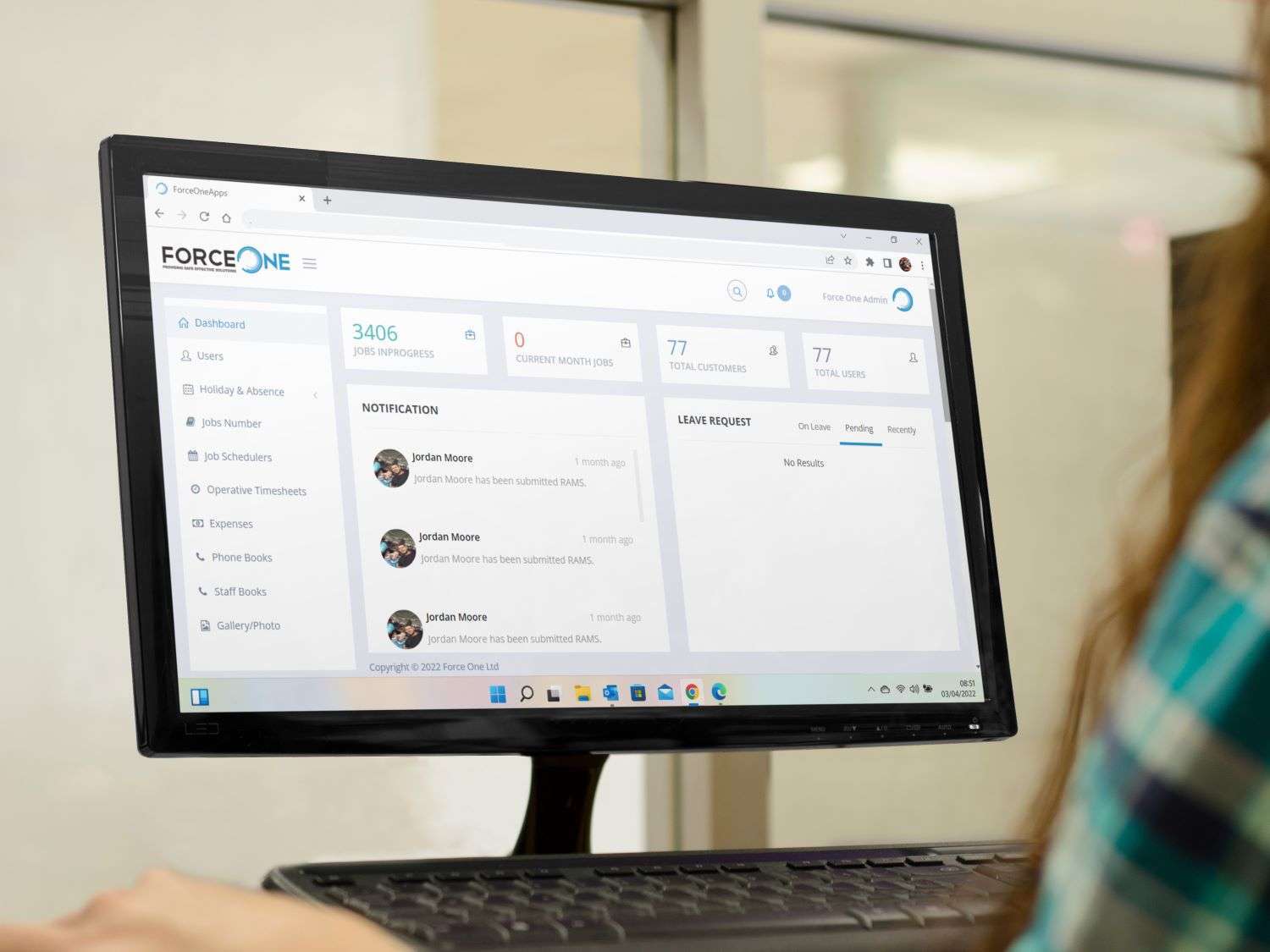
The desktop screenshot shows a separate Force One management interface with summary panels and activity lists. Together, the mobile and office views illustrate the two sides of a bespoke workforce system: an interface for staff completing tasks and a management environment for office users. The precise review and approval process depends on the agreed project specification.
Why build around your own workflow?
The value of a bespoke business system is the fit between the software and the organisation. Forms can use familiar terms. Records can collect the details staff need. Different roles can have interfaces suited to their work.
- Consistent information: agreed fields give submissions a clearer structure.
- Relevant forms: vehicle and site tasks can have different requirements.
- A familiar starting point: staff can find work tools and company resources through one branded app.
- Connected administration: operational records and staff tasks can be considered together when designing the system.
These are design benefits, rather than measured claims about time or money saved by Force One. For a new project, the right approach is to agree the problem, establish a baseline and test whether the proposed system improves the process.
Force One: questions and answers
What is the Force One business management system?
Force One is a project example combining a branded staff mobile app with an office management interface. The supplied screens show access to operational forms, vehicle information, timesheets, expenses, holiday requests and company resources. It illustrates how a dedicated system can organise several everyday processes around one business.
What can staff do through the mobile app?
The screens show staff entering working hours, submitting expenses with attachments, requesting holiday and completing structured vehicle and site forms. The home screen also provides routes to vehicle records, toolbox talks, photos, news, a phone book, health and wellbeing resources, and company policies.
How does it support vehicle checks?
Separate forms are shown for vans, LGVs and trucks. They collect vehicle and operator details alongside checklists appropriate to the form. Vehicle records also provide document sections labelled Inspection, MOT and 12 Weekly Inspection. These tools support recording and access; the screenshots do not establish automated reminders or checks of document validity.
Can it record site audits and operational checks?
Yes. The personnel site audit screen includes the date, time, operatives, company and site type, followed by structured site checks. A separate suction excavator form includes job and vehicle details with questions about parking, operators, induction and briefings. The forms capture information against the work being carried out.
Can staff submit timesheets and expenses?
The timesheet screen includes start and finish locations and times, breaks, travelling hours, site hours, depot hours, vehicle registration and work site. The expense screen includes a date, notes and an attachment field. These are examples of how a business can collect information in a consistent format.
Does the system include holiday requests?
The holiday form shows first and last dates, total days, a request type, comments and a signature field. This provides a structured way to submit a request. Approval rules, entitlement calculations and notifications would need to be confirmed separately; they cannot be established from these screens.
Could a similar system be developed for another business?
Yes. The useful starting point is your workflow, rather than copying every Force One screen. A dedicated system could use your terminology, forms and staff roles. Begin with the tasks that create the most repeated administration, then agree a manageable first release and how it will be tested.
Could a new system connect to our existing software?
Connections can be investigated during discovery. They depend on the interfaces, permissions and data available in the systems involved. The Force One screenshots do not demonstrate accounting, payroll or other integrations, so those should be discussed as requirements for a new project.
Will digital forms automatically make a business compliant?
Forms can help staff follow an agreed process and record checks, but software alone does not establish compliance. The business remains responsible for its procedures, form content, review and action on reported issues. Relevant requirements should be agreed with the people responsible for those processes.
What should we prepare before discussing a bespoke system?
Bring representative forms, an outline of who uses them and an example of what happens after submission. Explain the problems you want to solve, the existing tools involved and any connectivity constraints. This makes it easier to define scope, responsibilities and a useful first version.
What could a dedicated system bring together for you?
If your team relies on separate forms, spreadsheets and messages, start with one practical question: which everyday process would benefit most from clearer information?
Digital Solutions can help define a bespoke mobile app or business management system around your staff, records and working methods. The first step is to understand the work—not to add a long list of features.